|
Diagrams
-- Connectors
-- Mechanical Diagrams
-- Components
-- Harness
-- Grounds
-- Connector Views
-- Wiring Diagrams


-- Vacuum and Vapor Hose Diagrams
-- Exploded Views
-- Diagnostic Aids
-- Splices
-- Fluid Diagrams
Component Locations
-- Splice Locations
-- Harness Locations
-- Ground Locations
-- Connector Locations
Factory Specifications
-- Capacity Specifications
-- Maintenance Schedules & Procedures
-- Mechanical Specifications
-- VIN Definitions
-- Fluid Type Specifications
-- Electrical Specifications
-- Pressure, Vacuum and Temperature Specifications
Technical Service Bulletins
-- Chemicals,Additives
-- All Technical Service Bulletins
-- Customer Interest
-- Bulletins by Category and Symptom
-- Superceded Bulletins
-- TSBs Listed by Symptom
-- Seals, Gaskets
-- Labor/Parts Updates
Diagnostic Trouble Codes
-- Antilock Brake Codes
-- About Trouble Code Numbering
-- Transmission Codes
-- Manufacturer Codes
-- P, U, B Codes
-- Traction Control Codes
-- Engine Controls Codes
-- Air Bag Codes
|
Top -
Vehicle
 System
Component
The navigation path to the current component is presented as well as links to all the available technical data regarding this component, for example:
-- Service and Repair Procedures
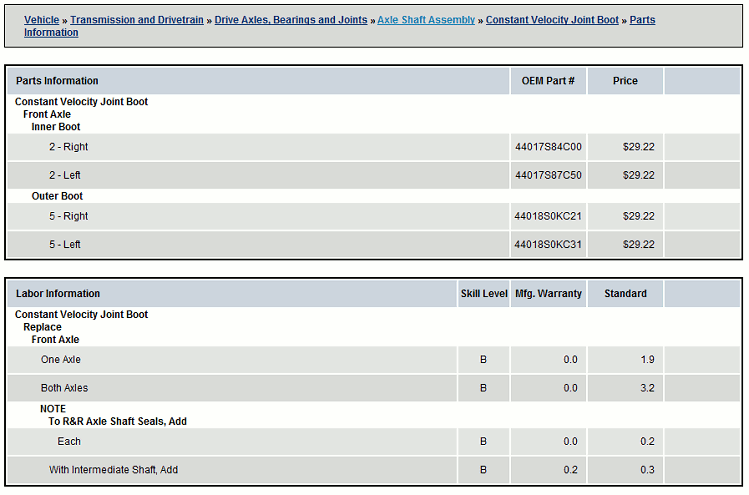
-- OEM Parts and Labor Estimates
-- Specifications
-- Technical Service Bulletins
-- Component Locations
-- Part Explosion Diagrams
-- Service Precautions
Vehicle Components by Subsystem
-- Restraint Systems
-- Relays and Modules
-- Maintenance
-- Drivetrain and Transmission
-- A L L Diagnostic Trouble Codes
-- Powertrain Management
-- Switches and Sensors
-- Power and Ground Distribution
-- Starting & Charging
-- Exhaust System
-- Suspension & Steering
-- Cooling System
-- Cruise Control
-- Washer Systems & Wipers
-- Body & Frame
-- Accessories and Optional Equipment
-- Windows & Glass
-- Lighting & Horns
--
Gauges, Warning Indicators & Instrument Panel
-- Brakes & Traction Control
-- Heating & AC
-- Engine
Factory Recalls
-- Safety Recalls
-- General Recalls
Component Search
-- Discover All the Info about a Subsystem with One Click
|

 icons to see some screen shots.